Jago Last Wish Feature
Bank Jago wants to present a new and different feature—changing the way people view life insurance and digital heritage, from being scary to being more positive, fun, and proactive. This feature will help users plan for the future, anticipate unexpected events, and still ensure a comfortable and enjoyable life.
Client:
Case Study Bank Jago - Skilvul
Date:
October 7, 2022
Type:
Mobile App
Role:
UI/UX Designer
For designing a product that is in accordance with the product vision that has been given, I used Design Thinking Process.
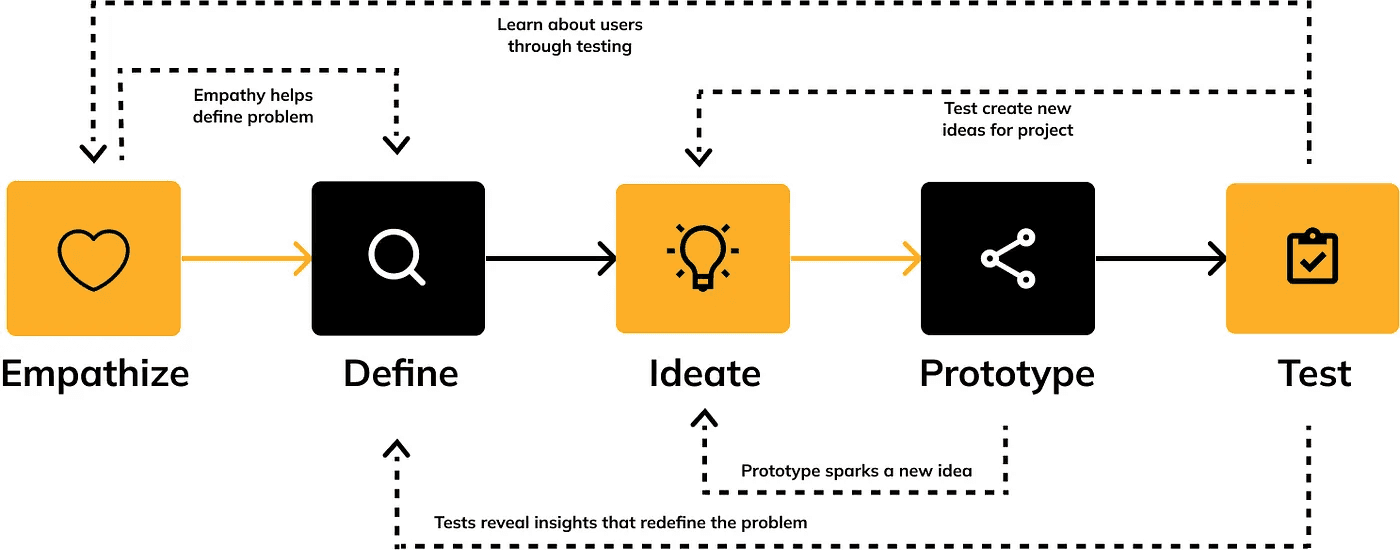
Stage 1— Empathize
The purpose of emphatize is to gather a deep understanding about user needs, by looking at it from their point of view. The way that can be done at the empathy stage is by observing or researching.
Secondary Research
In this case, I obtained data with conducted secondary research, by looking for any problems that users experience regarding wills and life insurance in similar applications competitor and articles, and the type of data I used was qualitative data, and here are some results :
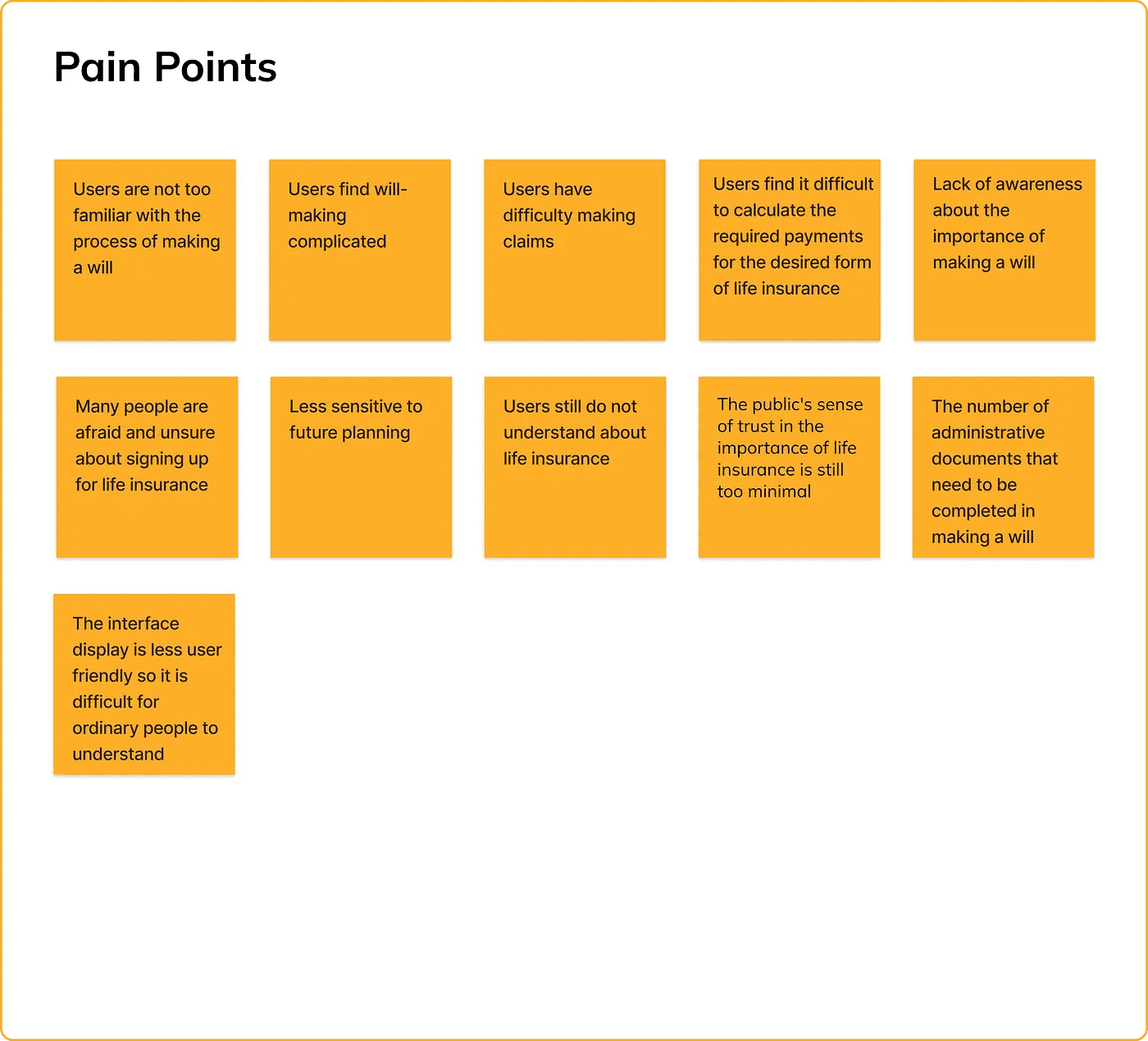
Many people are afraid and unsure about signing up for life insurance because they are not sensitive enough to plan for the future, and do not want to think negatively about death
The sense of public trust in the importance of life insurance is still too minimal, because there are many interpretations of life insurance, including those related to premiums, claims and equated with savings.
Do not have life insurance because you still do not understand
Confusion in calculating life insurance payments
Lack of awareness about the importance of making a will
Making a will is quite complicated, because there are many administrative files that need to be completed in making a will, not to mention if the file is wrong you have to go back and forth
The application is not user friendly, (competitors) who want to claim or check benefits are redirected to the web, they have to input ID and password back and forth, insurance claims are also complicated
Heir features (competitors) focus on UX which is appropriate, but from a UI perspective it is lacking, because when accessing features the placement of these features is difficult to find.
Stage 2 — Define
The information that has been obtained at the Empathize stage, will then be analyzed to determine the problem points that will be help and be defined. This define stage will be very helpful in solving user problems because have defined the problem.
Pain Points
After doing secondary research about life insurance and wills, I made a list of user pain points, here are the results :
Problem Statement
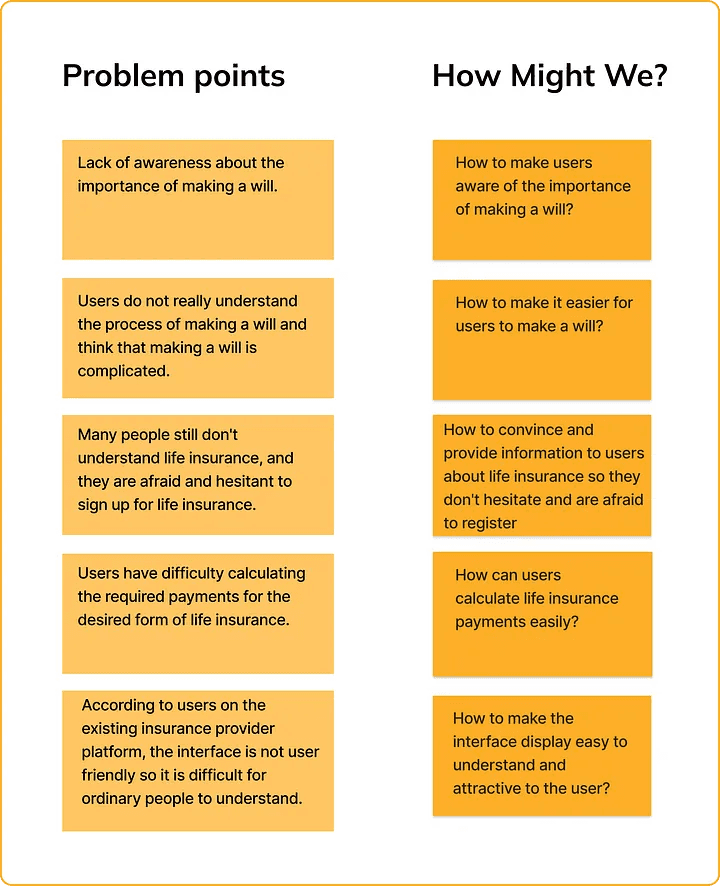
From the pain points that I got, I found some key insights and interesting problems that need to be solved :
Lack of public awareness about the importance of making a will.
Users do not really understand the process of making a will dan find the creation of a will complicated.
Many people are still do not understand about life insurance, and they afraid and unsure about signing up for life insurance.
Users have difficulty calculating the required payment for the desired form of life insurace.
According to users on the existing insurance provider platform, the interface is less user friendly, making it difficult for ordinary people to understand.
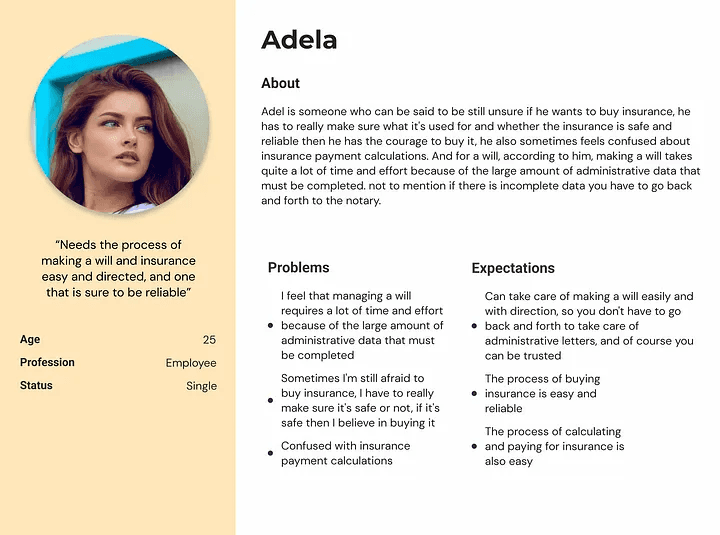
User Persona
Then i create user persona, persona is a characteristics that represents a group of product users. The objective is to understand the user’s objective and needs. It also helps to keep focused on user’s problems that needs to be solved.
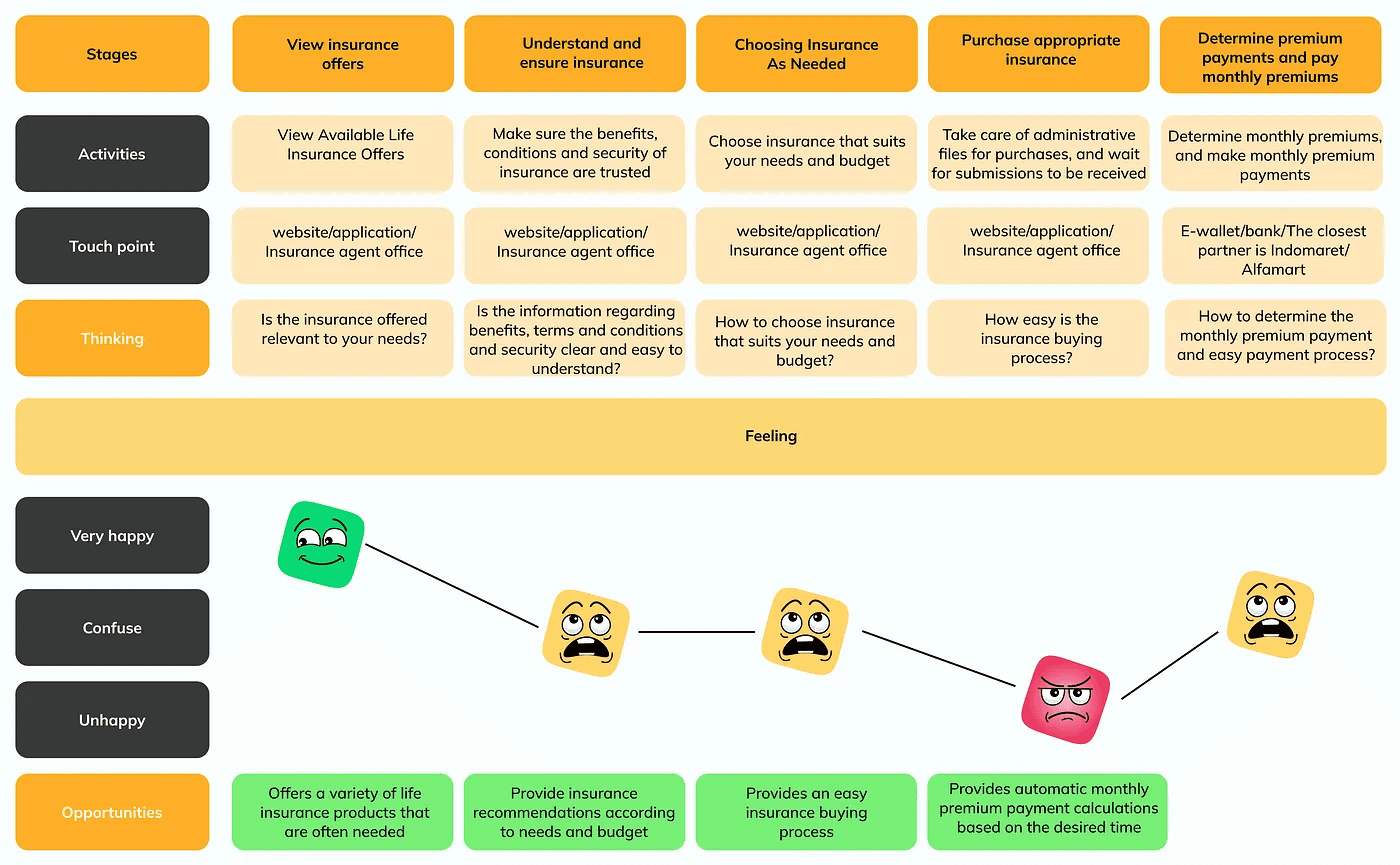
User Journey
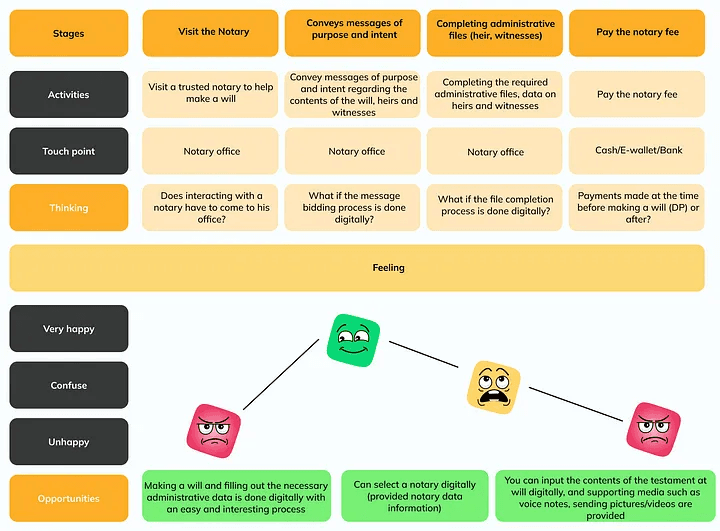
Here I also make a user journey to understand a user experience in buying insurance product and make a will.
This is the user journey when the user buys insurance product :
And this is the user journey when making a will :
How Might We?
And then, based on those problem points, I made a solutions be in the form of a How Might We list from it. Here are the result :
Stage 3 — Ideate
In this stage, generate ideas and solutions to solve the problems that have been collected at the Define stage.
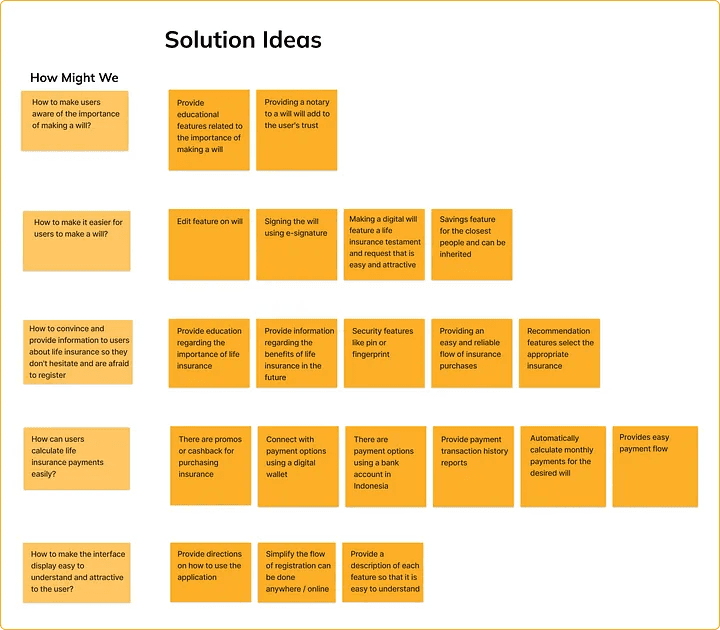
Solution Ideas
After I get the grasp of the user pain point and know how might we solve it, I dig down deeper and did a lot of brainstorming for generate features ideas that might help users based on the “how might we”. Here are the results :
Affinity Diagram
Then I grouped the ideas into an affinity diagram, and here are the results :
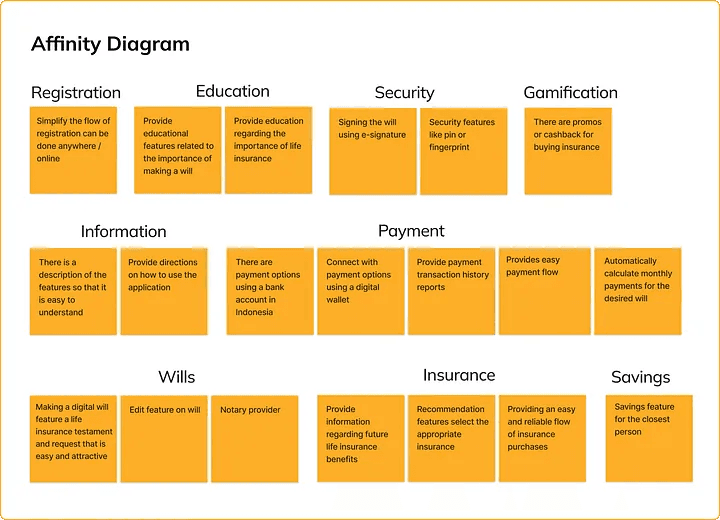
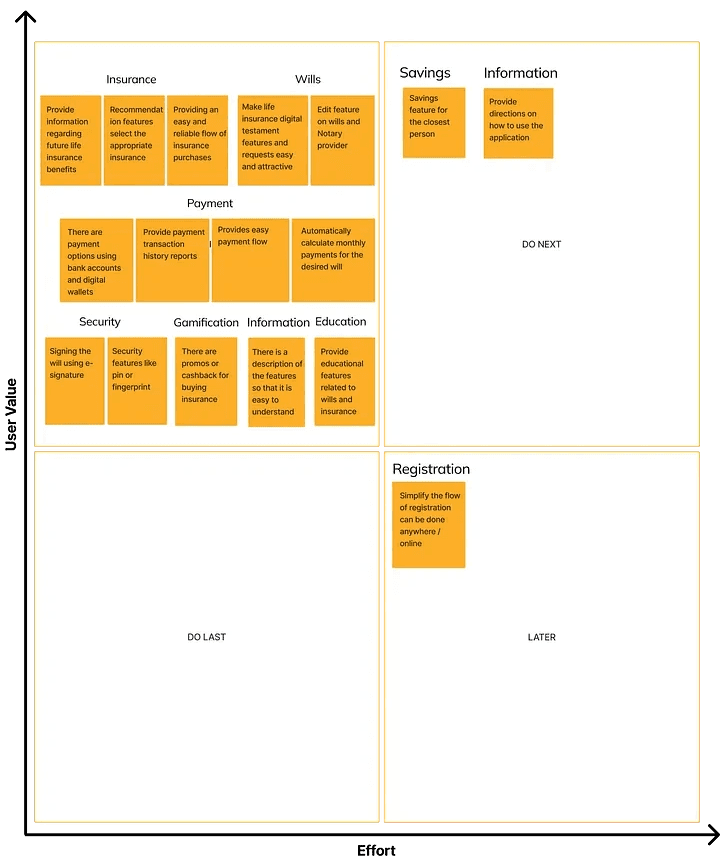
After I grouped ideas into affinity diagrams. I voted again for prioritize the ideas, so I can create solutions that measured by how much it will give an impact to business, internal and also customer. This is really important to determine which solutions that should I prioritized.
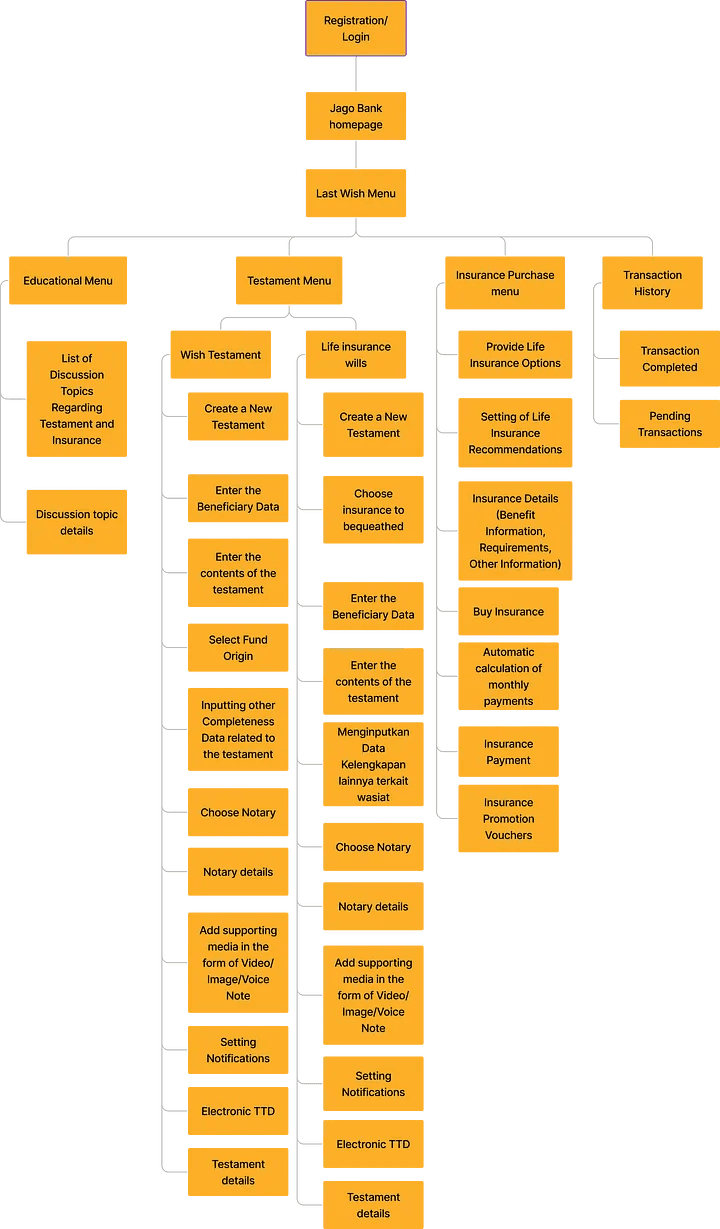
Information Architecture
After that, I create information architecture, information architecture functions to make it easier for users to find and understand the functions and content presented in the application, other than that was made to help the process on creating user flow.
User Flow
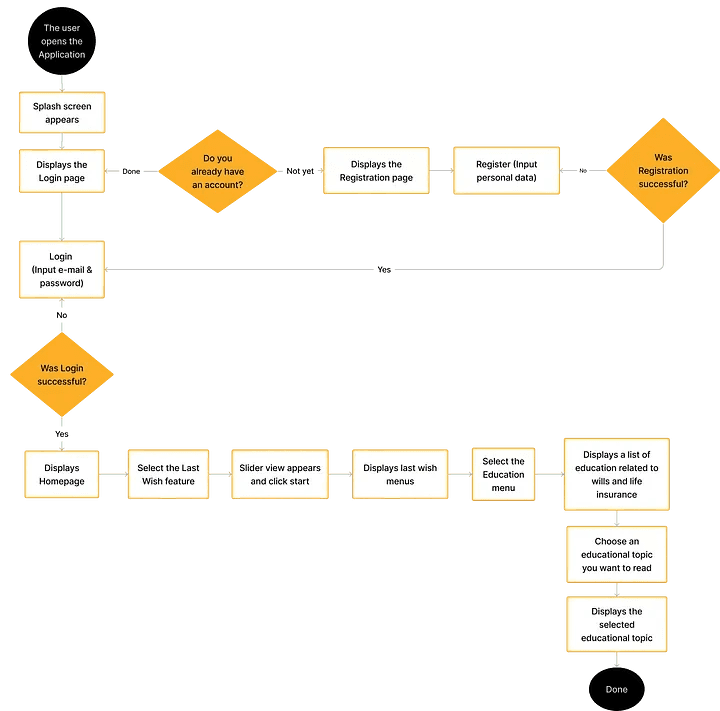
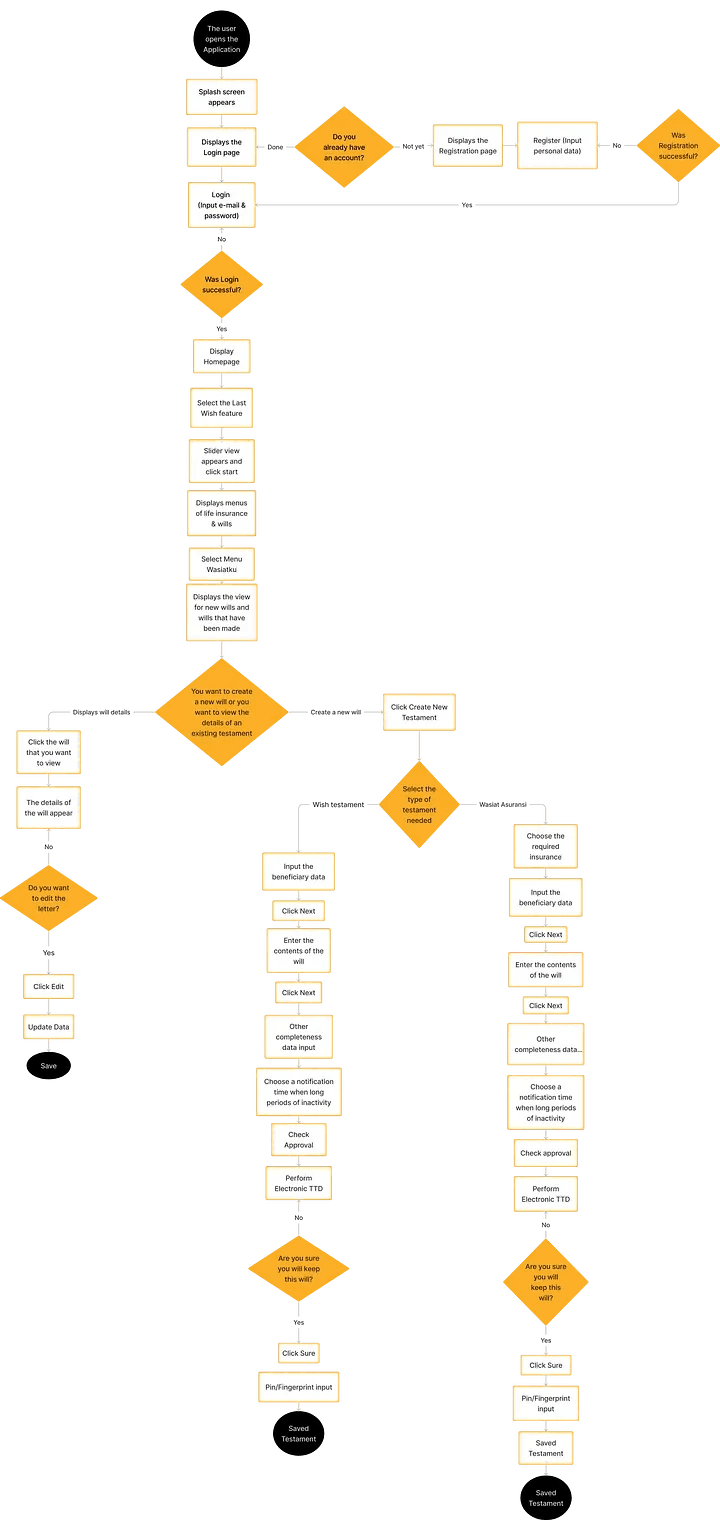
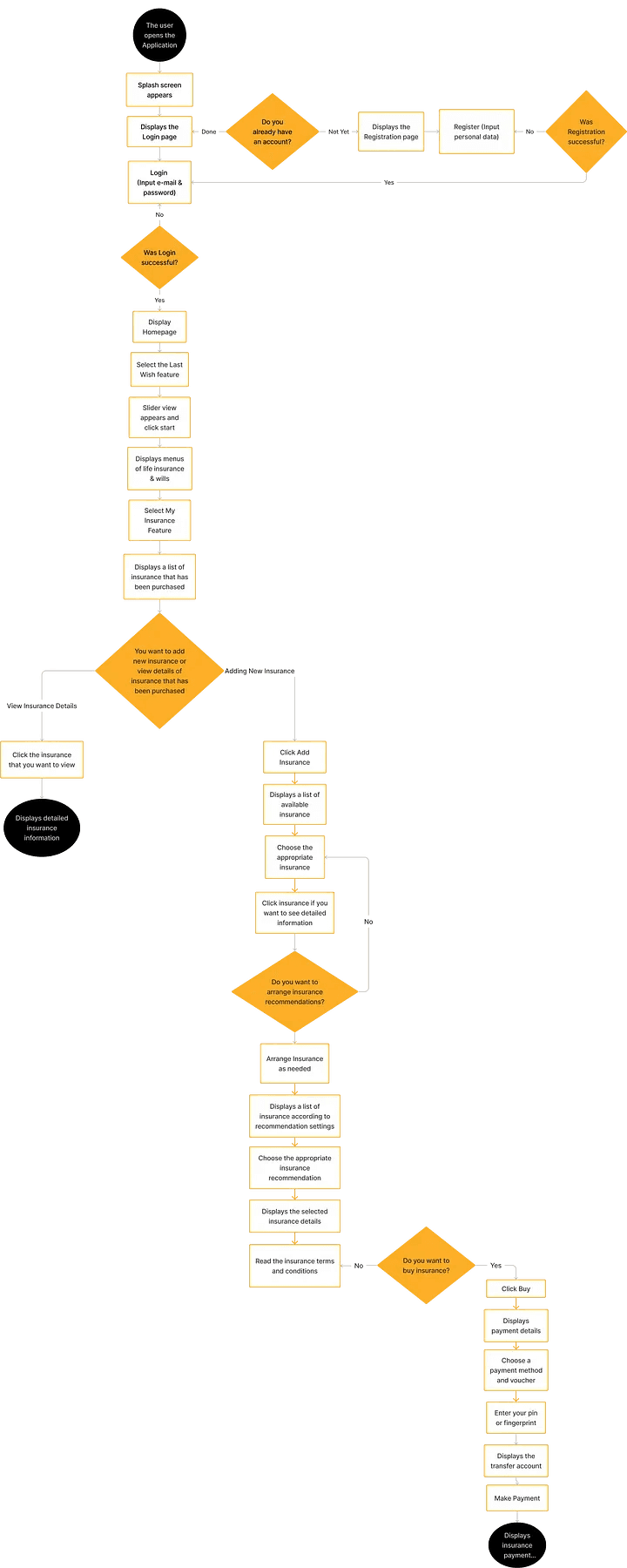
Then i create user flow, User flow is a process or steps that users do to reach their goals/their objective when using this product.
This is the result of the user flow that I have created :
Educational Menu User Flow
Wasiatku Menu User Flow
User Flow Menu Buy Life Insurance
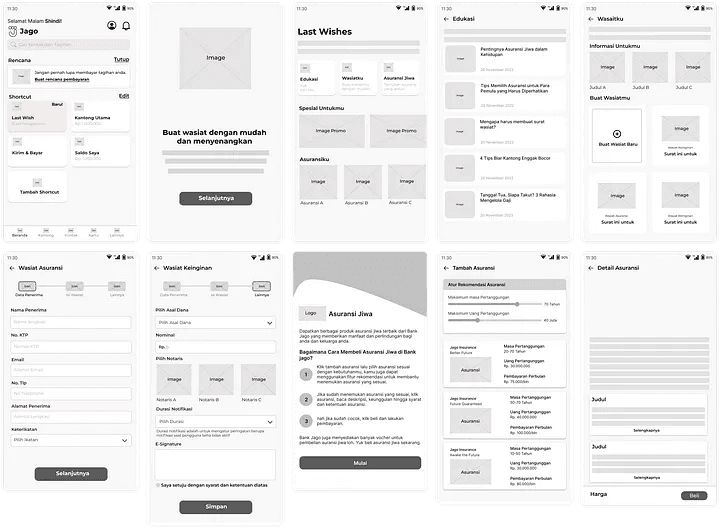
Wireframe
I made a wireframe to create a more detailed design framework before creating a high fidelity design. Here is the wireframe for Jago Last Wish :
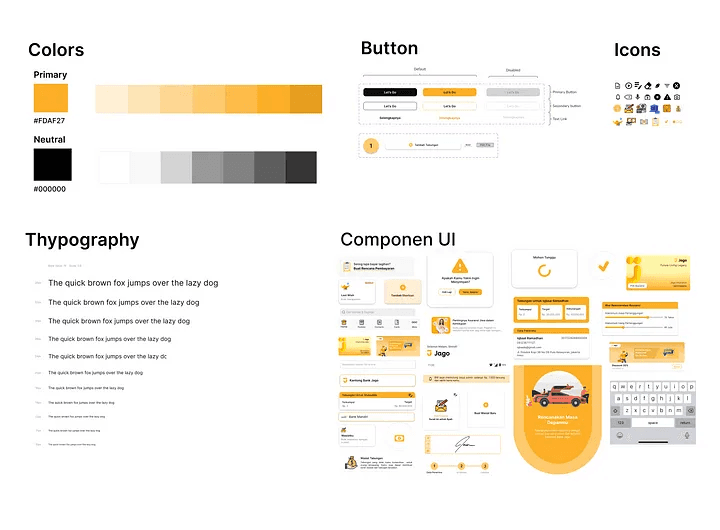
Stage 4 — Prototyping
After the concept was fixed, then I developed the UI. I made the design system first with choose colors, typography, and themes based on current Jago apps because this Last Wish feature concept will be inside the Jago app. I use the main orange color because the existing Bank Jago application uses orange color. and black as a neutral color. I use text inter because the text model is almost the same as the text for the Bank Jago application. Here is the design system that I have made :
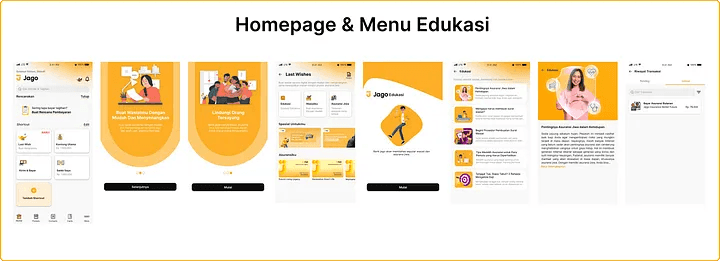
High Fidelity UI
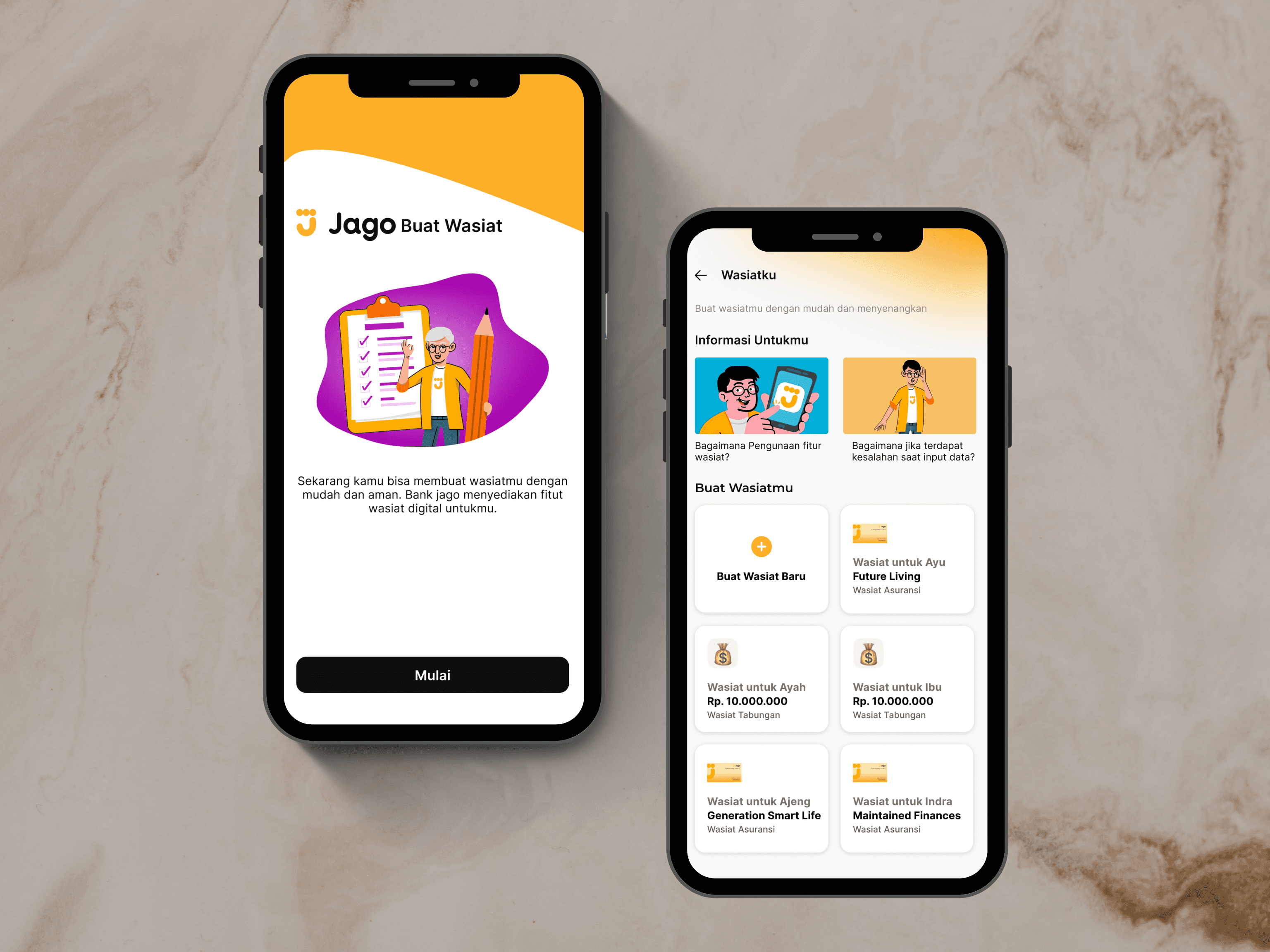
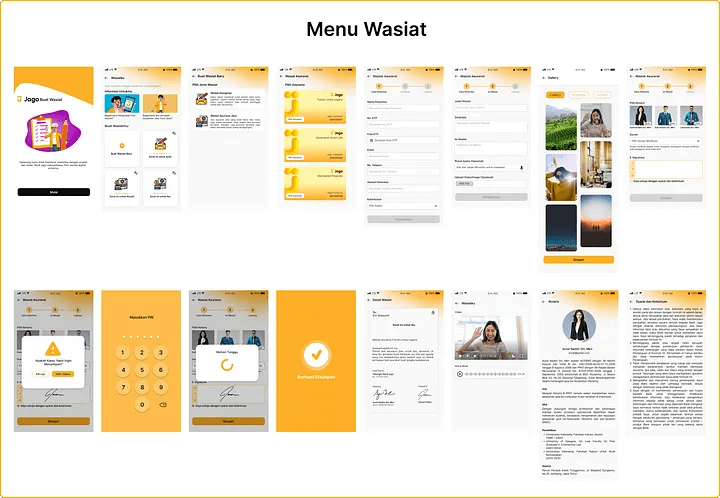
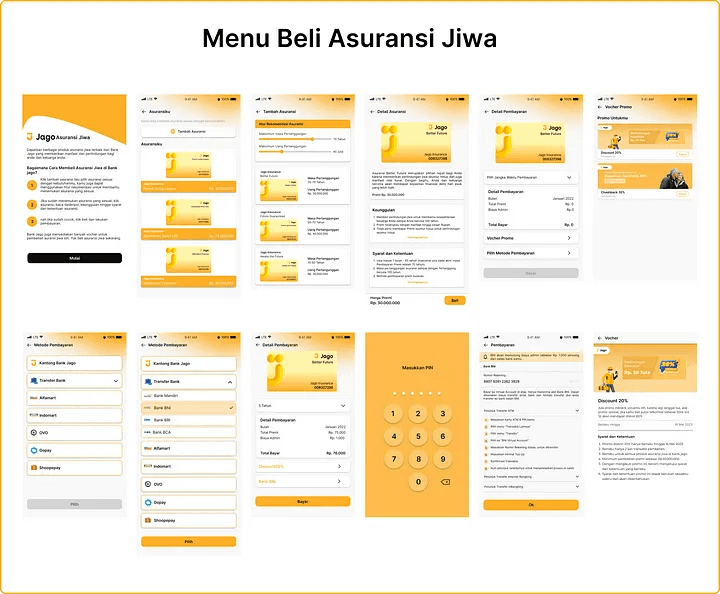
Finally, we enter the stage of making High Fidelity Design by applying the design system that I have made. This is the result of my UI design :
Prototype
After I finished the user interface design, the last step for this process is to make a prototype so that the design can be tested.
And here are the results, I very exiced to share this, please check :)
Stage 5 — Testing
User Testing is the last process of the Design Thinking Process that help validate my ideas and get user’s insight that I needed. I do this process using in-depth-interview and usability testing methods.
Responden Criteria
for the process of carrying out in-depth-interviews and usability testing, I am looking for participants who meet the following criteria :
Age 25–35 Years
Domiciled in an urban area
Profession as an Employee
Already have insurance from the office
Understand Technology and accustomed to using applications for daily needs
Get used to cashback as well as discounts
Have worries and care about the future and Quite familiar with wills
Testing Goals
General : Knowing the understanding & needs of users in making wills and life insurance as well as testing the last wish digital application’s will feature to find out the level of convenience and success of this feature
Sub-Objectives :
Test the user’s understanding of the digital testament feature
Testing user understanding regarding educational features about wills and life insurance
Test the user’s understanding of the life insurance purchase feature
Test Scenario
Introduction
Q&A about user experience and knowledge related to wills and life insurance
User test based on task:
[Task 1] Read education about wills and life insurance
[Task 2] Making a Wish Will
[Task 3] Make an Insurance Testament
[Task 4] Buying and Making Life Insurance Payments
[Task 5] View Transaction HistoryFinal Q&A session
Single Ease Question
Test Result
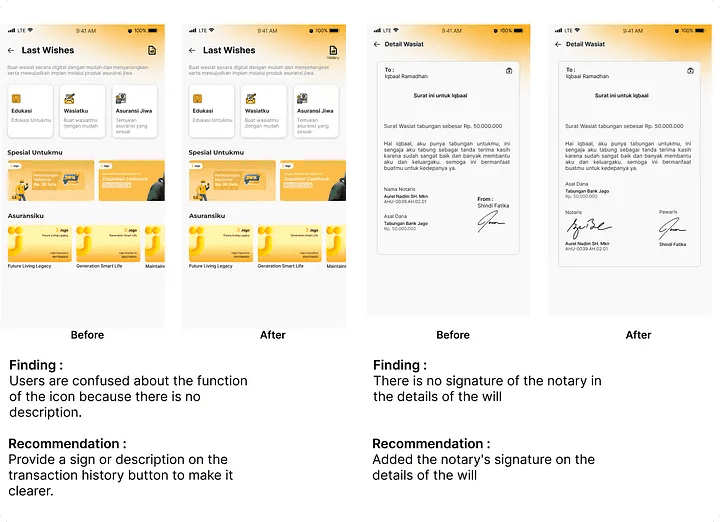
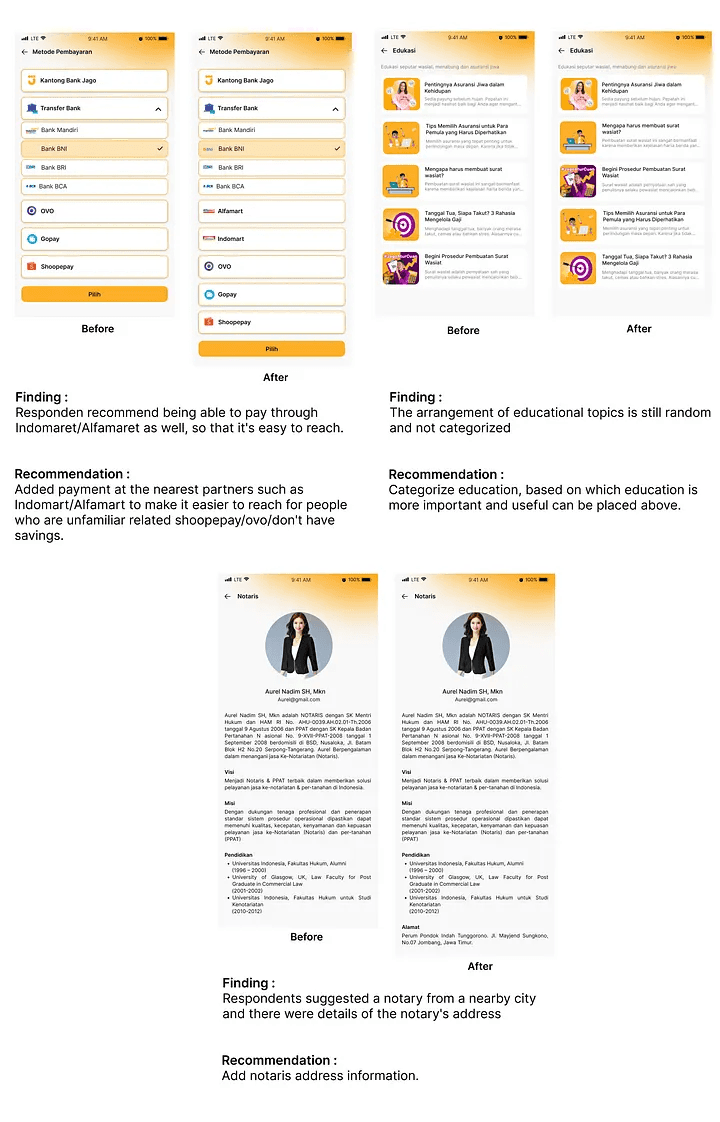
Most responden find this feature helpful, according to him the flow of using the application is also easy to use. and according to him the interface design is good. But there are several correction from respondents related to this feature, including the following :
Payments can be added can pay at the nearest partners such as Indomart/Alfamart to make it easier to reach for people who are unfamiliar related shoopepay/ovo/don’t have savings.
Categorize education, based on which education is more important and useful can be placed above.
Add notarized signature for each details of the will and add notaris address information.
Provide a sign or description on the transaction history button to make it clearer.
Single Ease Question
From points 1–7 the respondent gives 7 points, with the reason, her is greatly helped by this feature, her feels facilitated, because previously her took care of wills and insurance matters offline according to her found it quite time-consuming and power
Iteration
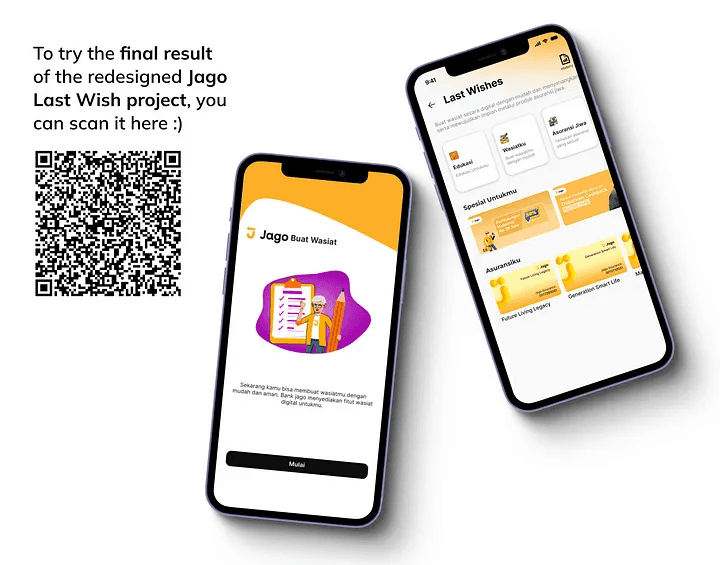
After I getting the result of usability testing, I decided to do iteration based on user feedback, here’s the result :